Trusted By 65,000 Professionals

Workiro Customers

SuiteFiles Vs Workiro

Both manage your documents.
But one has no clunky folder tree to maintain - and is best structured for AI.

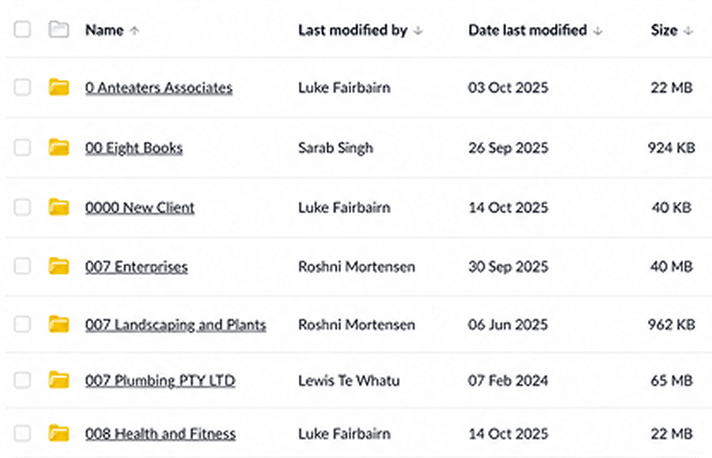
SuiteFiles organises work into trees of folders... but folders are where documents go to die.

Workiro organises work by tags – best for AI. Tags help you find files faster – and get better answers to your questions.

Book a Workiro demo

Pick SuiteFiles If...

• Your current folder system is always neatly organised. Your team loves filing.

• Your team is always at their desks – never needing documents on their mobile.

• You don't want to see related eSignatures and conversations on the client file.

• Staff don't mind digging through folders to find information.
Choose Workiro If...

• You'd like files to have automatic tags (auto-suggested by AI) for faster filing.

FUTURE-PROOFED • You want the best structured system for AI into the future.

• You want a mobile app for approvals on the go.

• You want to see related conversations, approvals and eSignatures against files.

• You want eSignatures to be auto-filed against clients.

Book a Workiro demo

SharePoint best-practice:
"The key is to use metadata instead of deep folder structures"

A
nd this is "even more important as organizations adopt Copilot." Source
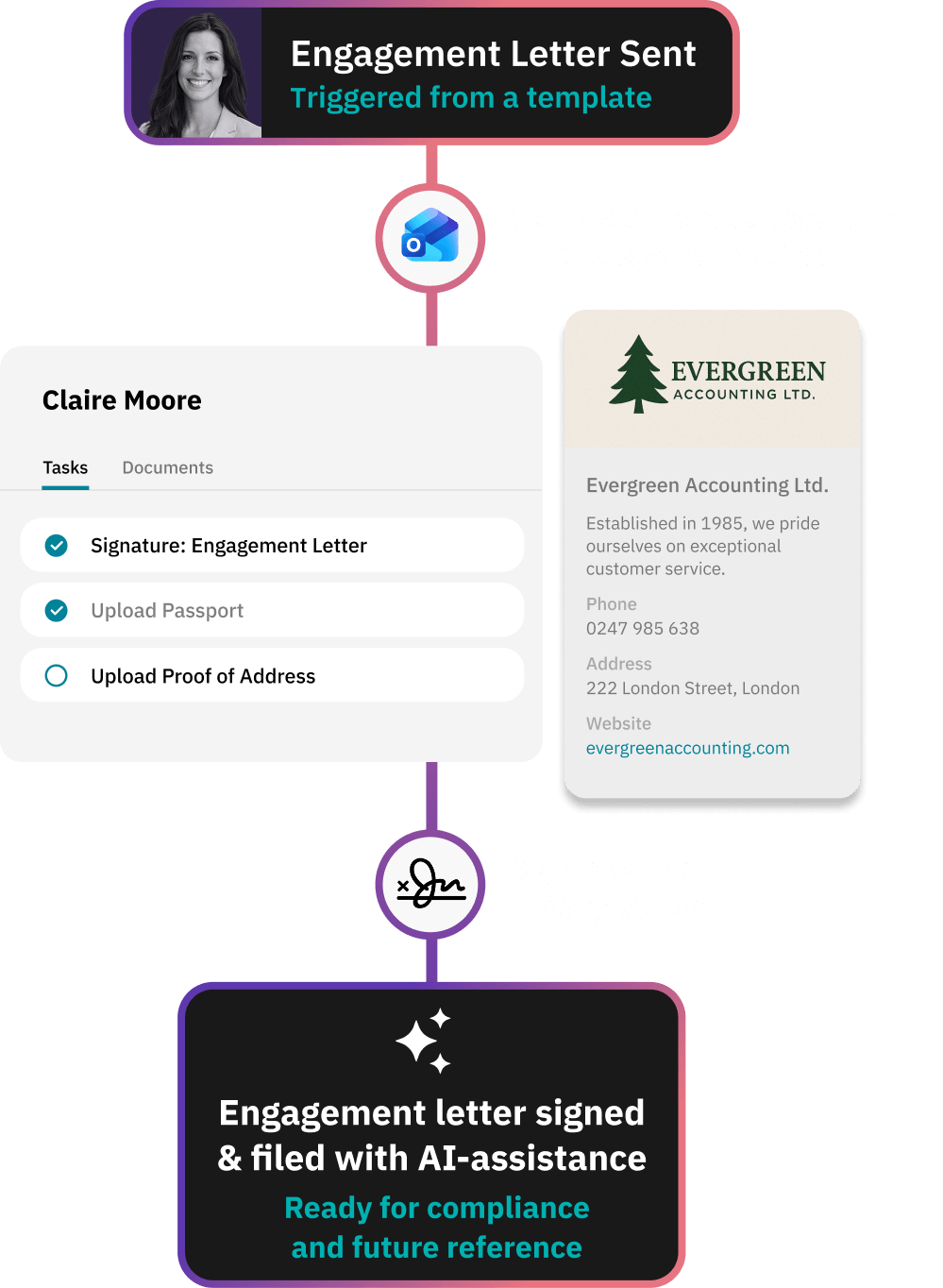
Client onboarding workflow in Workiro importing client data from TaxCalc, IRIS, Xero and CCH, then routing engagement letter review and signing

Folder trees aren't made for AI.Tags were built for AI to give you better answers.

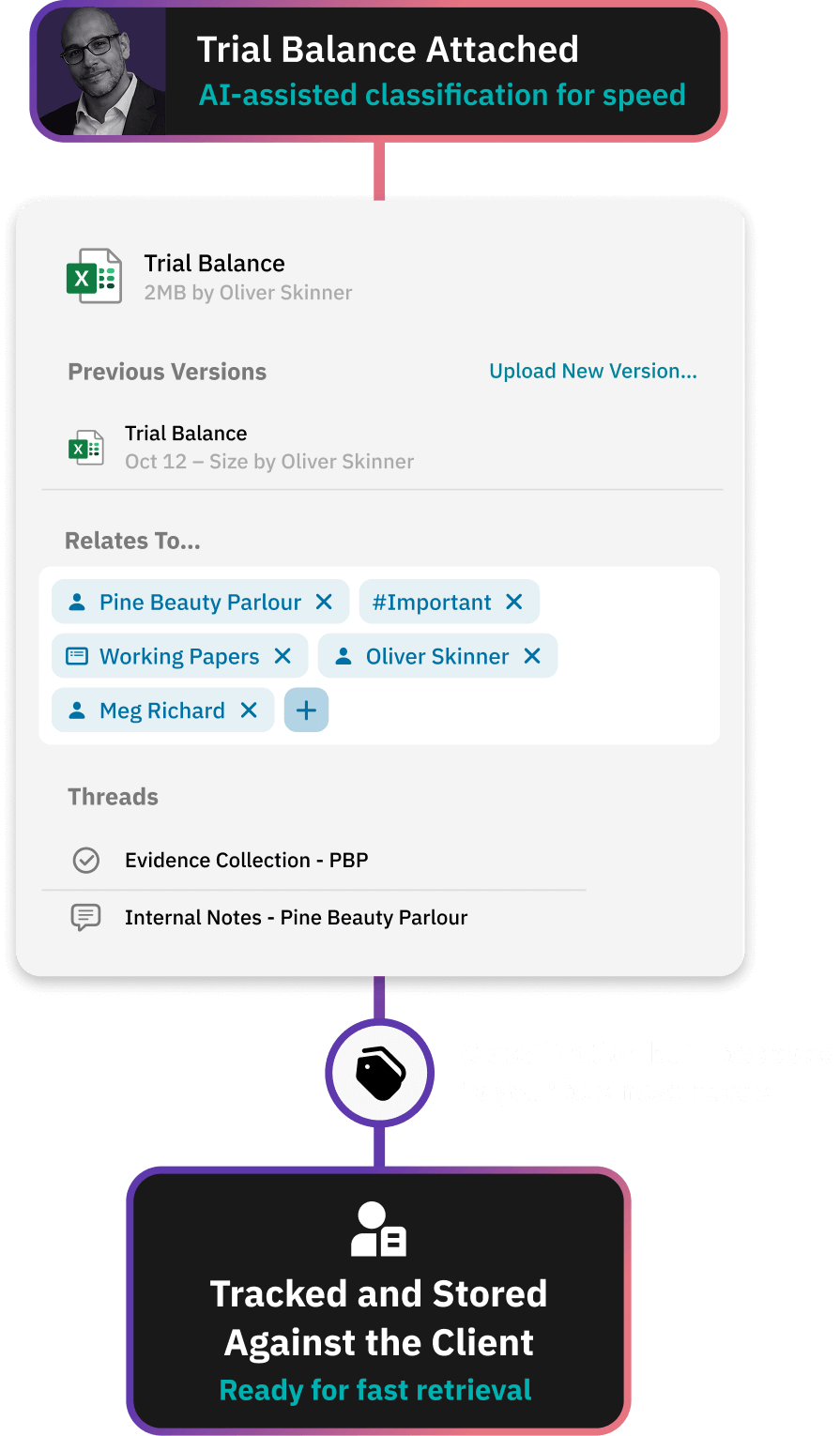
Every document in Workiro carries its own facts: client, year, job, signed ... or not.

So an AI assistant can answer "what's still unsigned for Smith's year-end?" with accuracy in seconds.

A file can't do that. And a folder tree is fundamentally not the best way for an AI to get the best answer.

Not because the AI is weak - because W:\Clients\Smith\2024 only means something to the person who filed it.

Whatever your firm adopts next - Copilot, ChatGPT, an agent - it reads the same facts.

Tagged records give it answers. A folder path only gives it a place to look.

Book a Workiro demo

Gartner predicts organisations will abandon 60% of AI projects unsupported by AI-ready data, through 2026. Gartner, 2025

"Everything is where it should be. Nothing gets lost. The whole story is there."

A Workiro customer

Rachel Fowler
Owner, Rachel Fowler Advisory

20 days

Saved annually in admin

100%

Case files now paperless

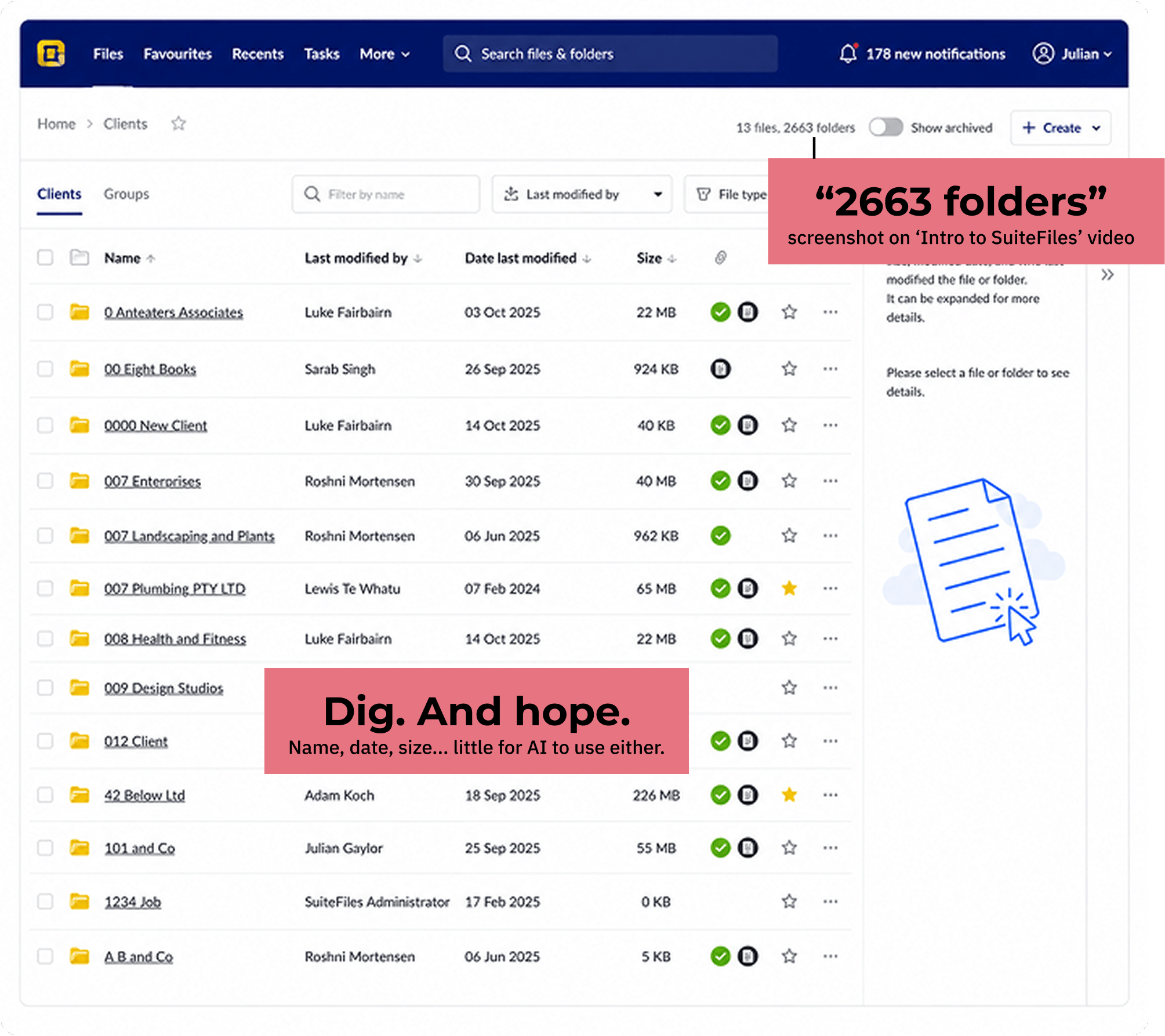
One makes you dig.
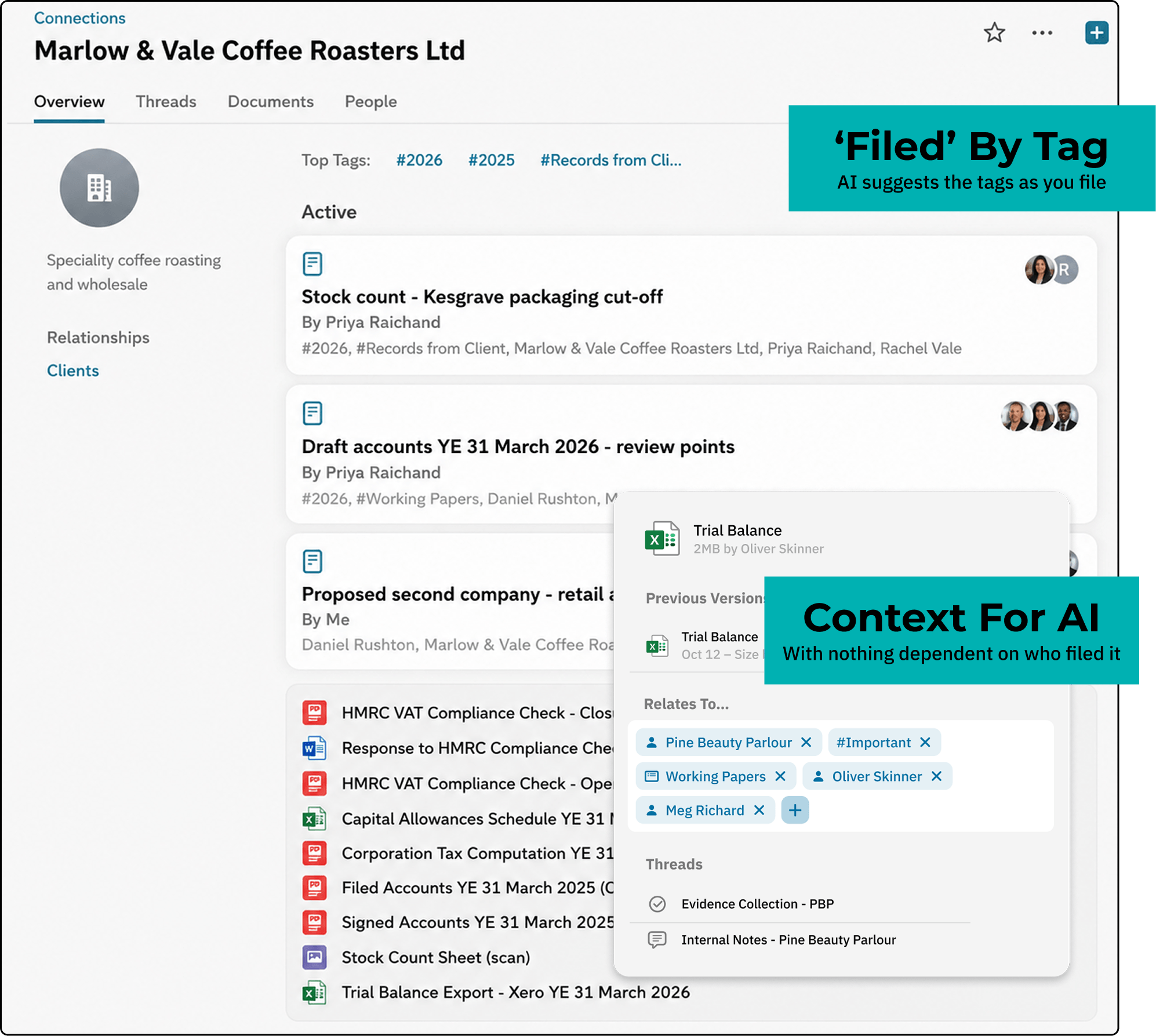
One surfaces answers.

SuiteFiles Screenshot:

From a live demo
Workiro Screenshot:

From a live demo
SuiteFiles screenshot 13th Aug 2026, "Introduction to SuiteFiles" video, youtube.com/watch?v=R-rzfdcrrNE

Results across real work:

The job SuiteFiles
It's 31 January and you've just found an unsigned engagement letter. How many more are there?
Wórkiro Answers in Seconds. One filter shows every unsigned letter in the firm. SuiteFiles Search filenames, then open folders one by one. A folder doesn't know what's unsigned.
A partner asks “where does this client stand?” Answer without opening a single file.
Wórkiro Answered. The AI reads the whole client record and tells you. SuiteFiles AI summarises one document at a time. The client-wide answer is still you, reading.
Get a client to sign today, not after they've reset a portal password.
Wórkiro Signed today. Your client clicks one secure link and signs. No account, no password, and it files itself. SuiteFiles The client creates a SuiteFiles Connect account and signs in. The portal sits on the top plan.
The regulator asks for one client's file. Hand over the whole story, not a folder of PDFs.
Wórkiro One record. Every document, message, approval and signature, time-stamped in one place. SuiteFiles Files and version history in SuiteFiles. Approvals and conversations live in inboxes.
Your best manager hands in their notice. Can anyone else find their clients' documents on Monday?
Wórkiro Found. Every document carries client, year and job, so anyone can find it from day one. SuiteFiles Findable if you can reconstruct the folder logic that left with them.
A partner has 20 minutes on the train. Approve the accounts from a phone.
Wórkiro Approved. Open the client record in the iOS or Android app and approve it there. SuiteFiles No iOS app; the Android app is a file viewer.

Source of table entries:

Sources — SuiteFiles claims taken from SuiteFiles' website and help documentation, verified 23 July 2026
Folder-based filing and filename search: "SuiteFiles is layered over your Microsoft SharePoint environment" — suitefiles.com/feature/store-securely.
AI works per document: "This will be done on a document by document basis" — help.suitefiles.com/suitefiles-ai-faq. AI Smart Templates announcement, May 2026 — [Anna: confirm URL on suitefiles.com].
Client portal login: "the first time a client uses SuiteFiles Connect… they'll get an email… to set up an account… using existing Xero or Google credentials, or create a SuiteFiles Connect account… then log in" — suitefiles.com/feature/collaborate-with-clients. Portal (Connect) included on the Super Suite plan — suitefiles.com/pricing.
Document records: document activity logs, version history and SharePoint retention — suitefiles.com/feature/store-securely.
Mobile: no iOS app listed; Android app is a document viewer (Office edits saved back manually); SuiteDrive desktop sync is Windows-only — help.suitefiles.com ("Our Apps" and Android app release notes) — [Anna: confirm exact help-centre URLs].
Workiro mobile, AI and filter capabilities as described at workiro.com, verified [publish date].

Workiro connects to the tools practices like yours already run:

Workflow diagram showing new client onboarding with auto-import from systems like TaxCalc, IRIS, Xero, and Kloud Connect, message exchange for engagement letter review and signing, followed by read receipts and built-in signing, concluding with AI-assisted faster document signing and filing against the client.

Hand an Auditor the Full Story in One Record

Without Workiro:

eSigning: lives on a higher plan tier, so entry-level seats fall back to email and a separate app.

Client sharing: depends on which plan you bought, not the job in front of you.

The evidence: is filed - but the documents, messages and approvals aren't linked into one trail when someone asks for it.

With Workiro:

eSignatures: are unlimited and native - auto-filed against every client, on every plan.

Client sharing: is a secure, no-password link - on every plan.

The record: holds documents, messages, approvals and sign-offs in one time-stamped, defensible trail.

Book a Workiro demo

“Before, if something wasn’t finished, it just sat in my head. Now I can see everything - what’s been sent, what’s signed, and what’s outstanding. That peace of mind is huge.”

A Workiro customer

Ben Symons
Director At Serenity Accounting & Bookkeeping

£40k+

Reclaimed in time saved each year

~50%

Less Xero PM admin time

A 98.4% Support Rating Over Last 120,367 Tickets

Free migration for eligible firms – book a demo for qualification
Workflow for giving clients a secure document portal without logins

7 Things to Ask on a Demo:

Find a document without knowing the folder. Time it.

Show one client's record: files, emails, approvals, signatures.

Open a client's record on an iPhone. Approve a document.

Is e-signing and the client portal on every plan, or the top tier?

Which of our stack integrates?

What does migration cost, how long will it take?

Book a Workiro demo

Frequently Asked Questions SuiteFiles vs Workiro:

Ask where a client stands and get an answer in seconds, pulled from the work and tasks on the client record. A folder path can't give it any of that - which is why AI on a folder tree can only hand you files to open. SuiteFiles' AI can summarise a document or fill a template - useful, but it works one file at a time. It can't tell you where the client stands, because in a folder system nothing connects the files.

Copilot inherits whatever your system holds. If that's folder paths and filenames, that's what it reasons over - and a path says where a document was put, not which client, year or job it belongs to, or whether it was ever signed. It's why Microsoft's own guidance is to use metadata instead of deep folder structures. Workiro attaches those facts to every document as standard, which is why its AI answers about a client instead of searching for a file.

Workiro's secure client link needs no client account and no sign-in, on every plan. The client clicks the link, and everything they do is tracked against their file.

Yes. Workiro has full iOS and Android apps, so reviewing, approving and signing doesn't wait for a desk. SuiteFiles has no iOS app, its Android app is a file viewer, and its desktop sync runs on Windows only - their own recommendation is the web app in a Chrome browser.

Yes. SuiteFiles Connect, its client portal, sits on the Super Suite plan - the entry Semi-Suite plan is document management without the portal. With Workiro, the secure client link is on every plan, so sharing files with a client isn't something you upgrade to reach.

They come with you - and the structure isn't wasted. Your folder paths become the starting structure in Workiro (client, year, type), so your client file is searchable by the logic your team already knows. From then on, new documents carry that structure themselves instead of relying on someone to maintain a tree.

Yes, with migration and implementation support, and your old system live throughout the move - so nothing goes dark while you switch. Medical Assurance Bureau moved over a single weekend - started Friday, live by Sunday.

Yes. Because your old system stays live during the move, you switch without a gap in access - even in the middle of your busiest season. See pricing and migration details, or how other firms made the move.