Trusted By 65,000 Professionals

Workiro customer

Works alongside your PM system workflows

Build a workflow once.
Run it for every client.

For Professional Firms
Accounting • Insolvency • Advisory • Insurance + More

Workiro routes every step of a job to the right person – with AI summaries available at every hand-off – working alongside the practice management system you already run.

AI-drafted hand-off summary attached to a completed task in Workiro

With AI summaries at every hand-off

Workiro Workflow Monitor showing every live job in an Australian accounting firm grouped by recipe – year-end financials, quarterly BAS, company tax return and individual tax returns – each task listed against its client

Award winning software used by 65K professionals of every size

Logos of BDO, Santander, RSM, Kreston Reeves, PKF, Larking Gowen and others displayed in a row.Logos of companies BDO, Santander, RSM, Belvoir, Kreston Reeves, PKF, and Larking Gowen arranged in two rows.Logos of financial, accounting, property and consultancy firms: BDO, Santander, Kreston Reeves, PKF, Larking Gowen, RSM.

Your practice management system runs the job. Workiro Workflows run the work around it.

Keep your PM system: Xero Practice Manager, MYOB, Access APS...

Workiro Workflows sits beside your practice management system to accelerate the work between your deadlines – all while building an automatic evidence trail across every review, approval and client sign-off.
Logos of companies BDO, Santander, RSM, Belvoir, Kreston Reeves, PKF, and Larking Gowen arranged in two rows.Logos of financial, accounting, property and consultancy firms: BDO, Santander, Kreston Reeves, PKF, Larking Gowen, RSM.
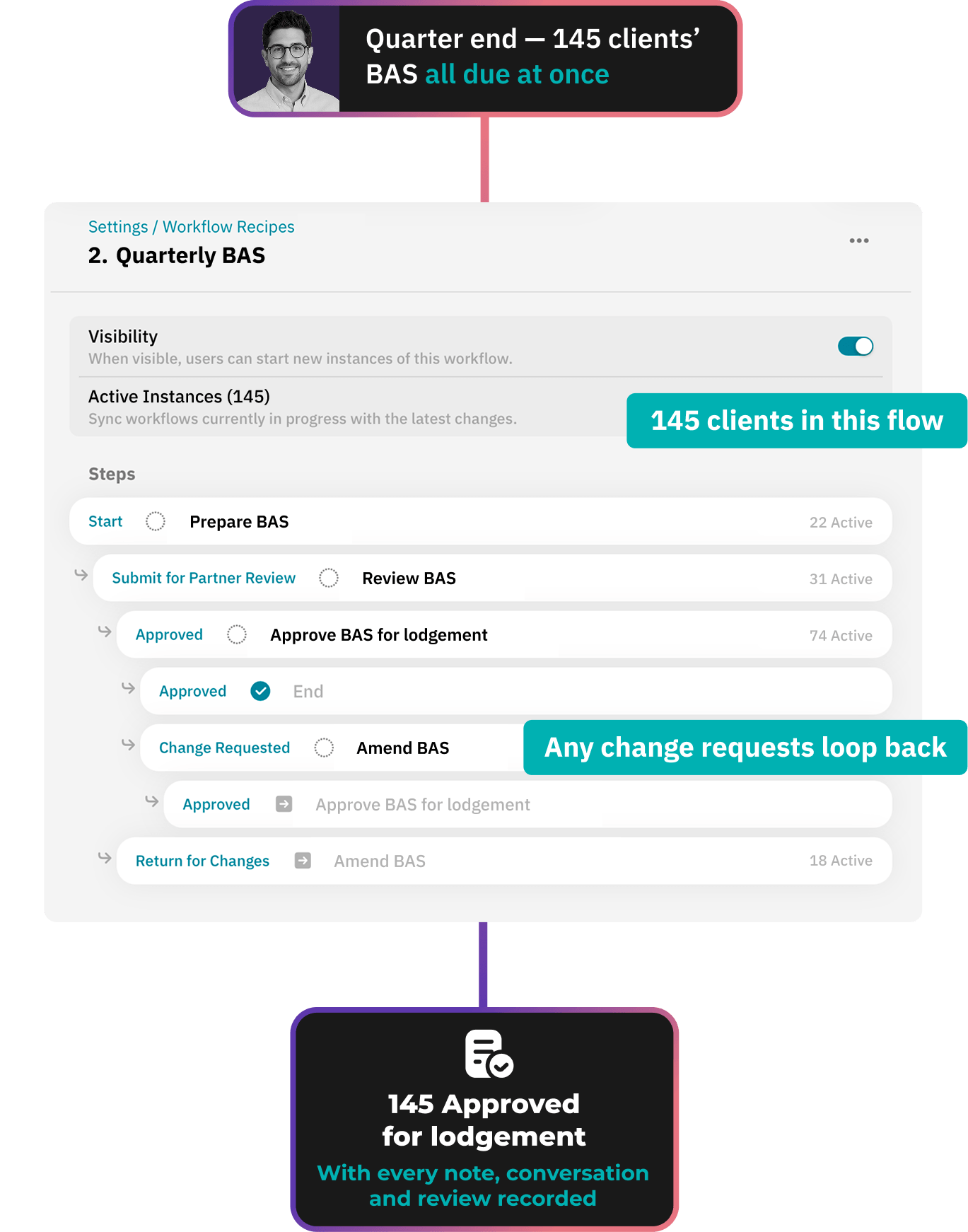
Workiro workflow looping a quarterly BAS back to the preparer after a partner requests changes, with the documents still attached

Partner wants changes? The workflow simply loops back
– no restarts, nothing lost.

A quarterly BAS return is the same job over and over – but the most painful part is almost never the numbers. It's the single change request that complicates the entire process.

Most tools: a "change request" is a status-change– but someone still has to pick the work up and assign it.

With Workiro: a change request creates that next task and assigns it – including all context and documents.

"Everything is where it should be. Nothing gets lost. The whole story is there."

A Workiro customer

Rachel Fowler
Owner, Rachel Fowler Advisory

20 days

Saved annually in admin

100%

Case files now paperless

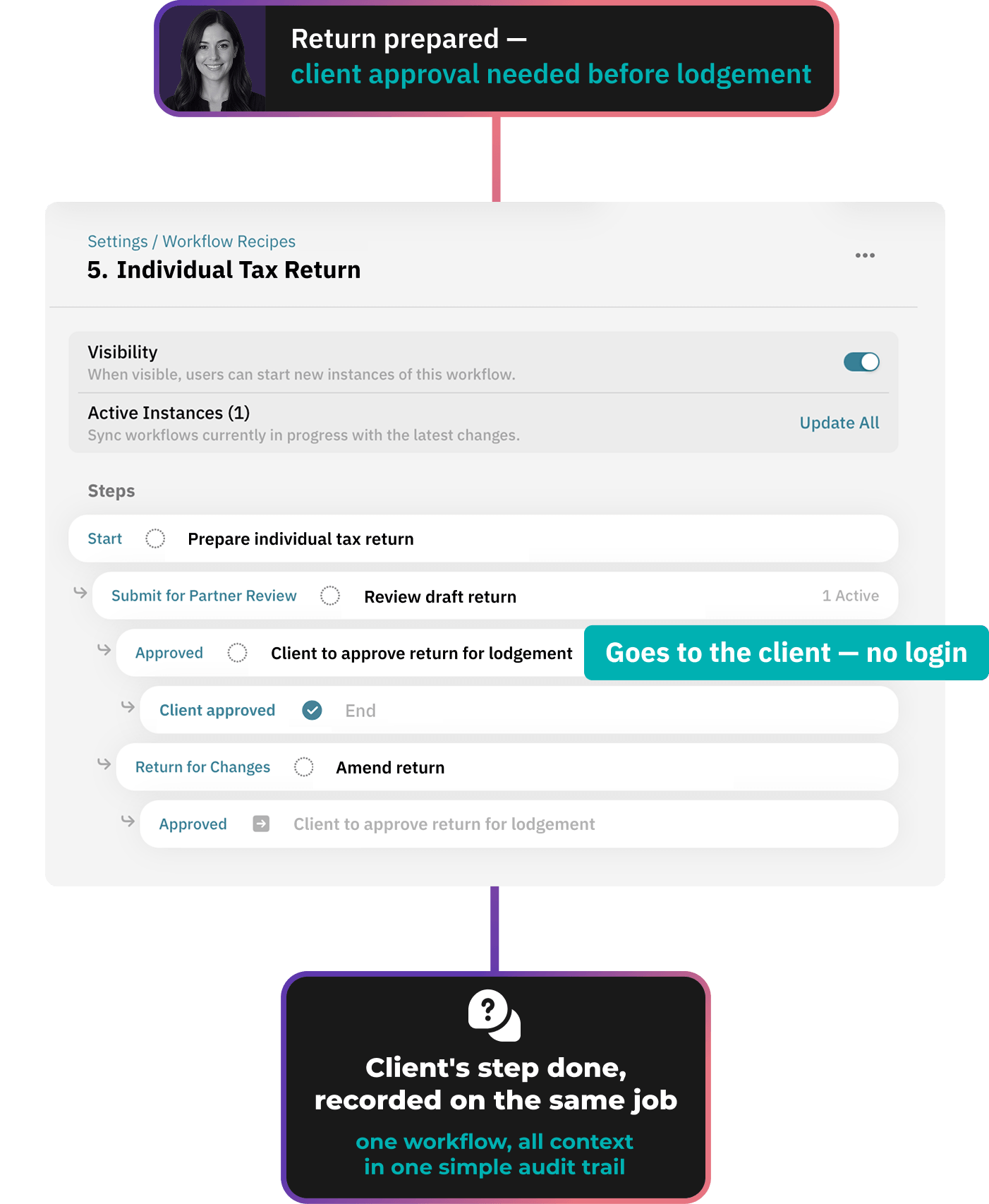
A client approval step inside a Workiro workflow, sent by secure link with no login or password needed

The work doesn't stop when it reaches the client.

Normally this is where the work leaves the system. You email the client, they reply to the wrong person, you chase, and the accounts sit in an inbox until it lands.

Here, the client's approval is a step in the workflow. They get a secure link with no login, showing only the documents you chose.

They complete it, your team confirms the outcome, and the next step opens on the same record.

Most tools: the workflow ends at your team's last internal step. Everything after that happens in an inbox.

With Workiro: the client's step sits inside the same workflow. One workflow, one record.

“I haven’t had anybody come back and say ‘I can’t work with this’ - it’s easier for clients than our old portal.”

A Workiro customer

Susan Rickerby
Director, Lloydbottoms Chartered Accountants

15

years of documents now in the cloud

0

client logins now required for signing

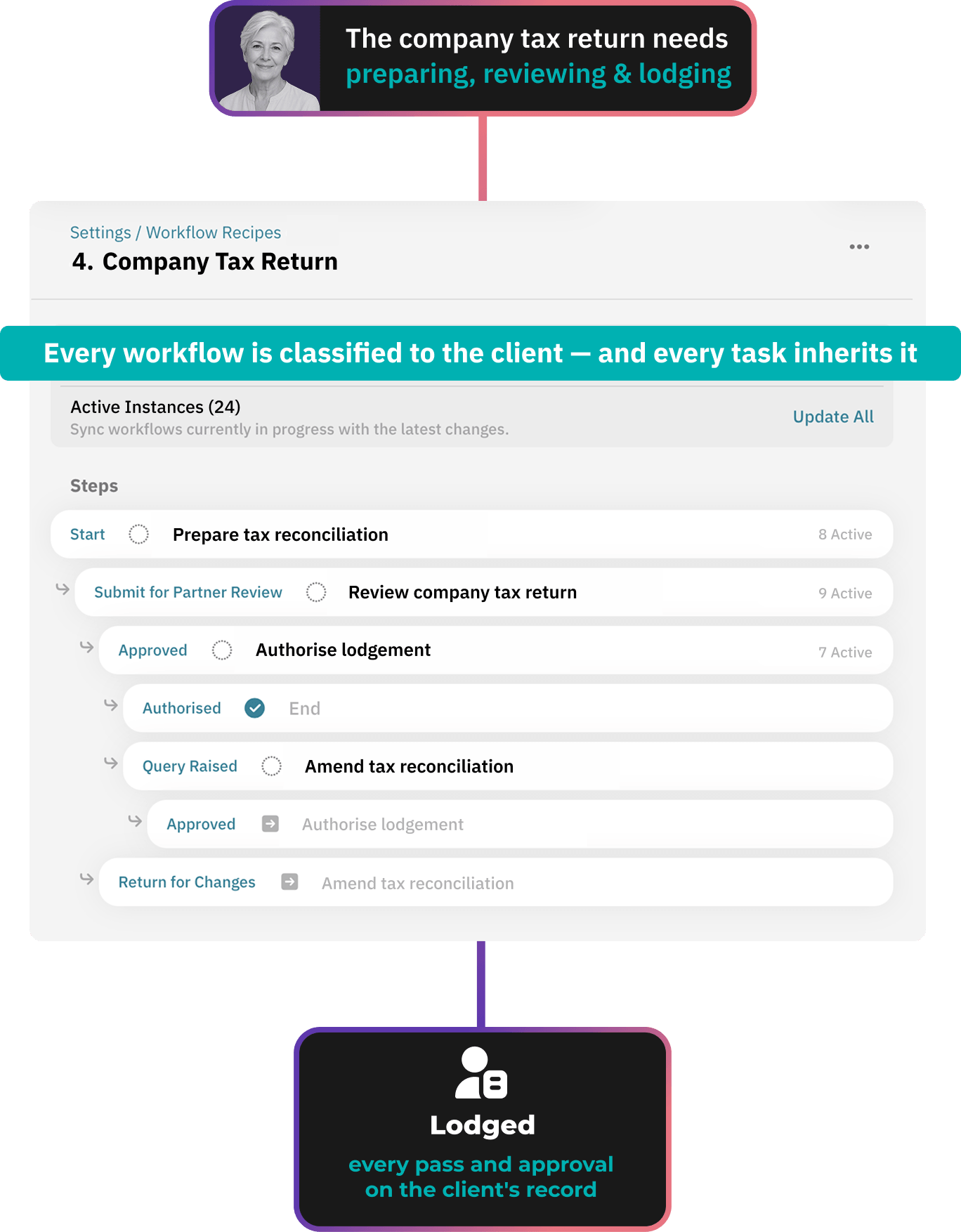
Workiro audit trail showing who prepared, reviewed and authorised each stage of an Australian company tax return

The evidence trail builds itself.

A return is only as defensible as the trail behind it: who prepared it, who reviewed it, what changed on the second pass, who authorised the filing.

Two years on, the ATO asks – and reassembling that from an inbox costs somebody an afternoon, or a week.

Most tools: the workflow lives in a workflow system, and the documents live somewhere else. Joining the two back up is a full time job in itself.

With Workiro: classify the workflow to a client once and every task it creates inherits it. No separate silos to reconcile – the audit trail is a scroll– not a search.

"Something that took a week can now be done in an hour. Before, you assumed clients received things. With Workiro, you know."

A Workiro customer

Steven Burch, Financial Planner
Ketton Wealth

768hrs

A year saved in administration

90%

Reduction in turnaround times

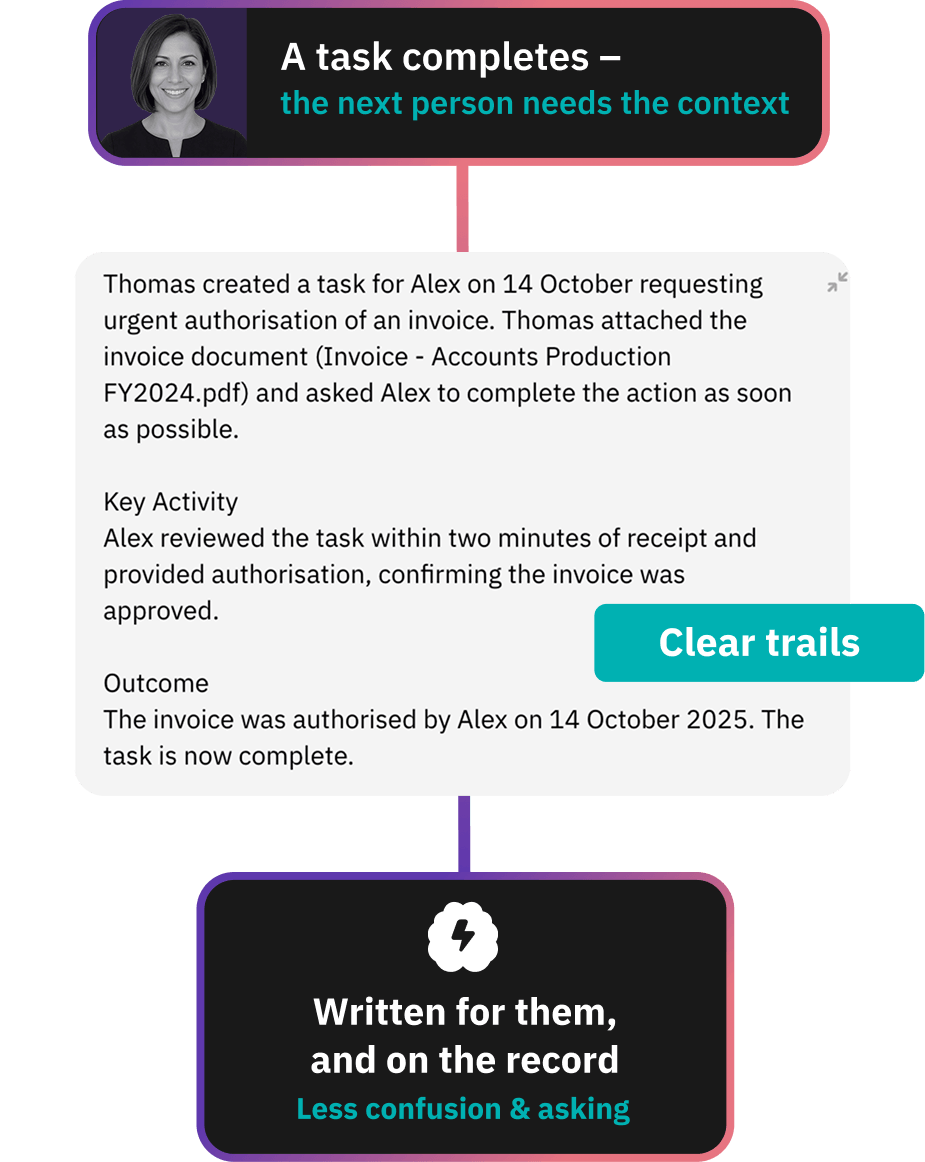
AI-written hand-off summary in Workiro recording what happened on a completed task and the outcome chosen

No hand-over notes.
No "where did you get to?"

The context is already there when you need it.

Use AI to draft a summary for each completed task: the what, where and who. Nobody has to chase a colleague for background, it's a click away the moment someone needs it.

Book a Workflow demo

"Having one source of truth for collaboration between teams and clients enables us to deliver exceptional service.”

A Workiro customer

Martin Bugg
Director at Larking Gowen

Top 40

Award-winning accounting firm

450

Sized team

Workiro job board showing every live job in the firm with a named owner and the time spent at each stage

Every live task in the firm on one board.

Year-end passes through three or four pairs of hands. The risk is the wait: the file sits with a manager who's on leave, and the first you hear of it is from the client.

With Workiro every step has a named owner and record of the time it has sat at that stage.

Most tools: each person has their own task list, so "where has this got to?" is a question you ask a human.

With Workiro: one board shows every live task in the firm – group by recipe to see a process, or by person to see who's drowning.

“Before, if something wasn’t finished, it just sat in my head. Now I can see everything - what’s been sent, what’s signed, and what’s outstanding. That peace of mind is huge.”

A Workiro customer

Ben Symons
Director At Serenity Accounting & Bookkeeping

400+

Hours reclaimed annually

~50%

Less Xero PM admin time

Set It Up Once. Run It Forever.

Workiro workflow recipe builder showing the steps, roles and outcomes that route a client job automatically

Nobody has to remember how a job runs anymore

Map the steps once, with instructions on each task. This way a new starter runs year-end the way your best manager does.

Risk removed: a job living in one person's head.

The workflow adjusts to the right person

Build the workflow using roles – Approving Partner, Reviewing Manager, Client Contact – instead of naming people.

Risk removed: a task sitting untouched because it was assigned to someone who's since left the firm or is on annual leave.

Nothing waits for someone to pass it on.

The outcome of task decides where it goes next: an approval progresses it. A change request loops it back.

Risk removed: a finished task sitting for three days because nobody passed it on.

Your client can't get stuck at a login screen.

No account to set up, no password to reset, no falling back to email because they couldn't get in.

They get a secure link to their step, showing only the documents you chose.

Risk removed: an approval that never arrives because the client gave up at the portal.

Workiro Workflows For Accountants And Professionals FAQs:

Accounting workflow software turns a repeatable job – year-end financials, a BAS quarter, onboarding a new client – into a set of steps, routes each step to the right person automatically, and records what happened at every hand-off. Workiro Workflows does this alongside your practice management system, so the evidence trail builds itself while the work moves.

No. Your practice management system keeps the job, the deadline and the fee. Workiro Workflows runs the work around it – the requests, reviews, approvals and client sign-offs – and files every document and email against the client record. Firms keep Xero Practice Manager, MYOB or Access APS and add the workflow layer beside it.

Workflow software decides what happens next. Document management decides where the evidence ends up. Keep them in two systems and somebody has to reconcile the two. In Workiro they are one record: classify a workflow to a client once and every task, document, email and approval it creates is filed against that client automatically.

Yes. A step can be assigned to the client and it behaves like any other task in the job. They get it through a secure link – no account, no password – carrying only the documents and wording you chose. They complete it, your team confirms the outcome, and the job moves on. Nothing sits in a portal waiting to be noticed.

The job loops back rather than starting again. The answer at the end of a task decides where it goes next: approved sends it forward, change requested sends it back to the right person with the documents and context still attached. Nothing is re-keyed, and the second pass is part of the same record as the first.

One board shows every live job in the firm, with a named owner on each step and a record of how long it has sat there. Group by process to see how a service is running, or by person to see who is buried. The question "where has this got to?" stops being something you ask a human.

A quarterly cycle is the same job repeated, which is exactly what a workflow is built for. Map the sequence once and it runs per client, per quarter, with the client's own approval step and the reminders included rather than bolted on afterwards. The same applies to super guarantee cycles, FBT and annual review dates. Cantor Carnevale turned client work around 25% faster from job to payment after moving it onto the platform.

Workflows are built by your firm, so they follow whatever your process is – quarterly BAS, company and individual tax returns, ASIC annual reviews, STP finalisation, FBT, super guarantee checks or client verification under the AML/CTF obligations that now apply to accountants. Workiro also connects to the Australian tools you already run, including CAS 360 and Xero Practice Manager.

Every document, message and approval sits inside the client's record with permissions controlling who can open it, and the audit trail records who did what and when. Client steps travel by secure link rather than a shared inbox. Full detail on certifications and data handling is in the Workiro Trust Centre.

In the no-code recipe builder: map the steps once, write the instruction that sits on each task, and assign steps to roles rather than names so the right person is picked when the job runs. A recipe stays hidden until it validates, so a half-built process cannot go live by accident. The Workflows help guides walk through building, starting and monitoring one.

Accounting workflow software maps a repeatable job – year-end financials, a BAS quarter, onboarding – into steps, routes each one to the right person, and records who did what. Workiro Workflows runs alongside your practice management system, so the evidence trail builds itself as the work moves.