Trusted By 65,000 Professionals

Workiro customer

Connect Claude to Workiro – MCP Server

Bring AI to your client files. Without handing over the keys.

For Professional Firms
Accounting • Insolvency • Advisory • Insurance + More

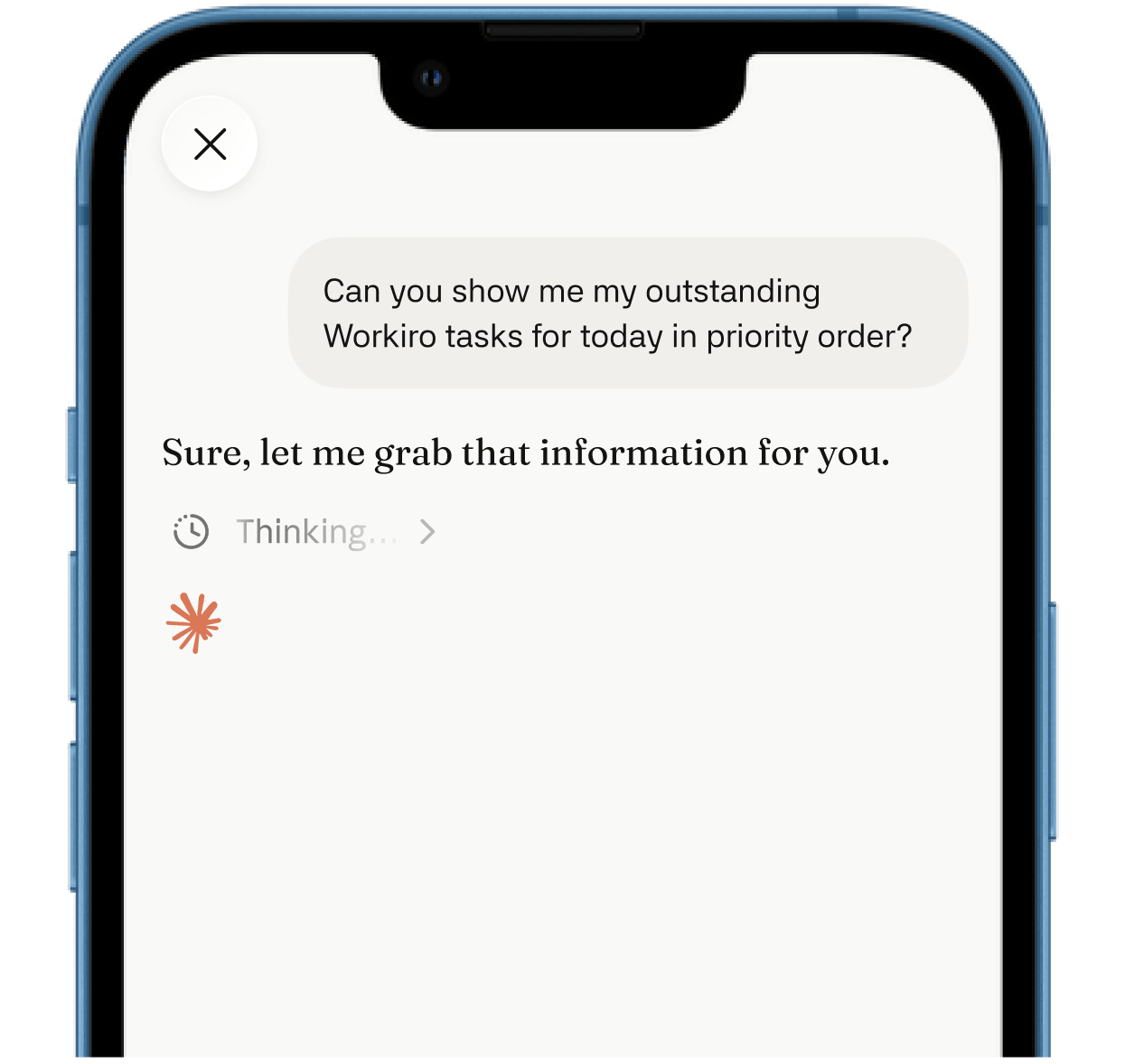
Connect AI to Workiro: ask it to find a document, pull a client's history together, or draft from the file.

AI-drafted hand-off summary attached to a completed task in Workiro

With AI summaries at every hand-off

Workiro Document Management Workflow diagram showing software logos, and steps: auto-generate client file with 50% less admin, request documents via no-password secure link, AI-assisted filing for faster categorisation, and client onboarded with hours faster and data securely filed.

Award winning software used by 65K professionals of every size

Logos of BDO, Santander, RSM, Kreston Reeves, PKF, Larking Gowen and others displayed in a row.Logos of companies BDO, Santander, RSM, Belvoir, Kreston Reeves, PKF, and Larking Gowen arranged in two rows.Logos of financial, accounting, property and consultancy firms: BDO, Santander, Kreston Reeves, PKF, Larking Gowen, RSM.

You don't want your document system to be the AI. You want it plugged into the best one.

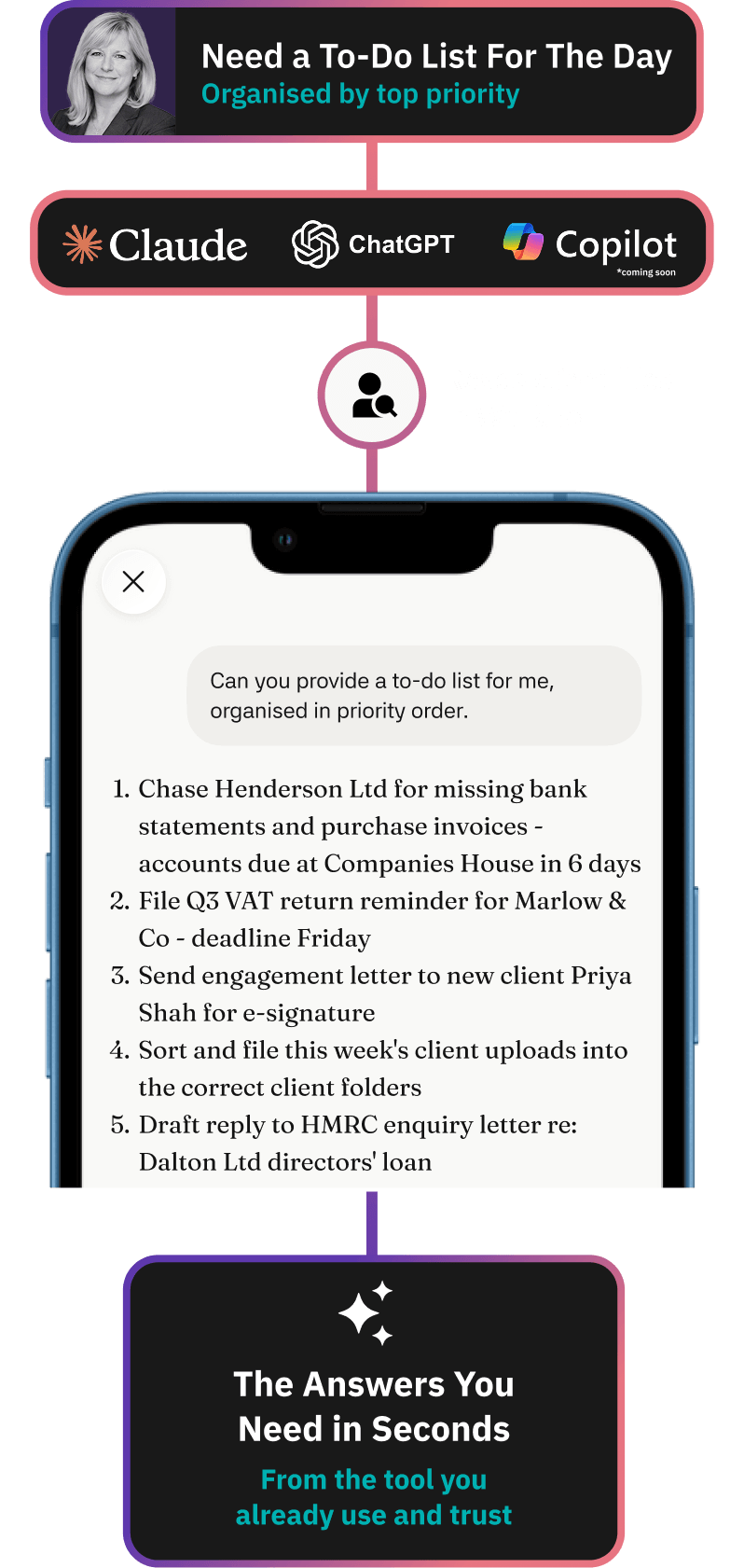
The frontier models move fast, and no document tool is going to out-build Claude, ChatGPT or Microsoft Copilot.

So rather than bolt a single AI inside Workiro and lock you to it, we connect Workiro to the models your firm already trusts - and keep doing the job we're best at: keeping the client file complete, filed and defensible.

Plug in the best AI. Keep your evidence trail.
Logos of companies BDO, Santander, RSM, Belvoir, Kreston Reeves, PKF, and Larking Gowen arranged in two rows.Logos of financial, accounting, property and consultancy firms: BDO, Santander, Kreston Reeves, PKF, Larking Gowen, RSM.
Workiro workflow looping a job back to the preparer after a partner requests changes, with the documents still attached

One question used to mean a morning of digging. Now you just ask.

To answer "where do we stand with this client?", you'd open the engagement letter, the last set of accounts, the AML checks and three email threads, then rebuild the picture in your head.

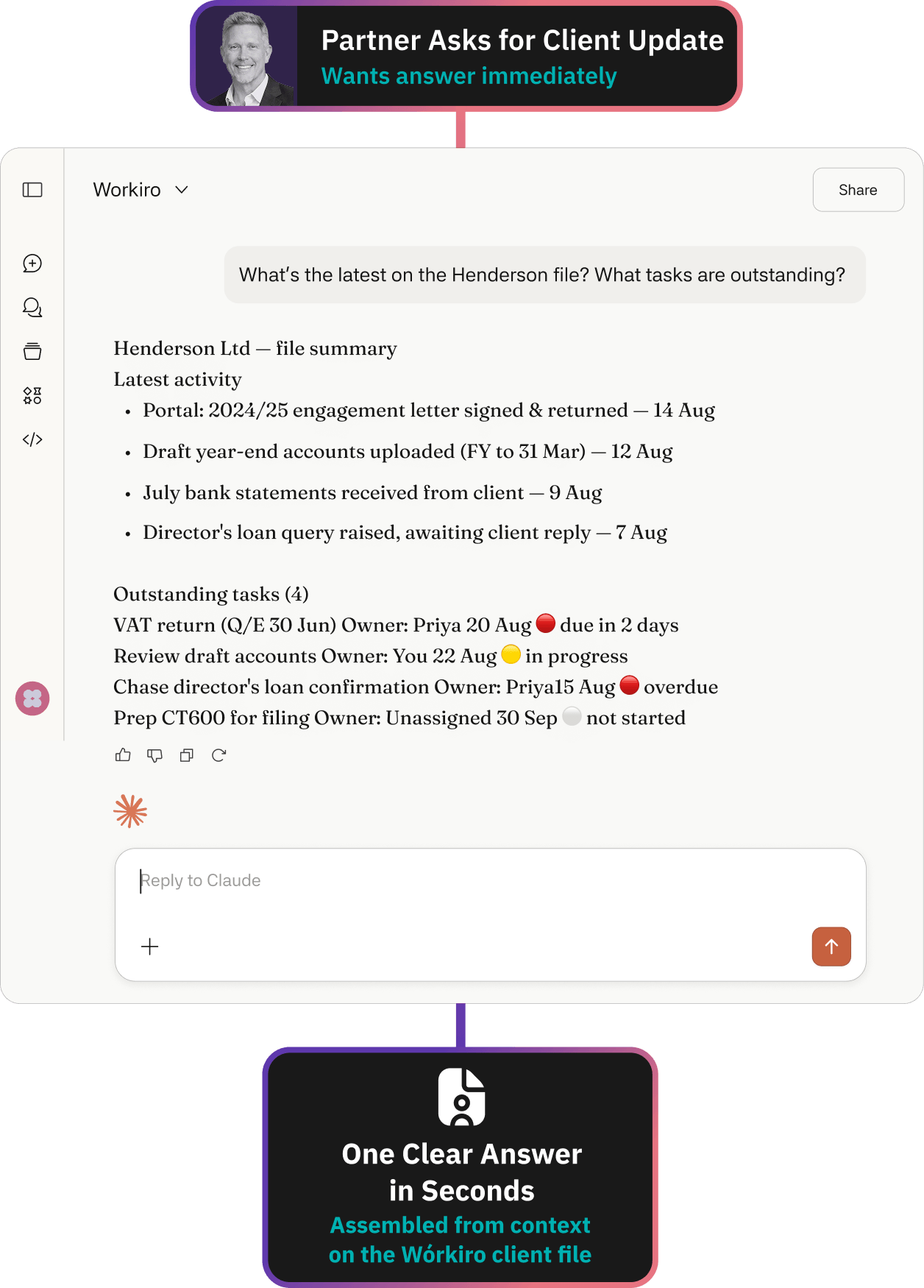
Ask Claude instead, and it reads across the client file to hand you the answer in seconds.

Before: You ask three colleagues, read through several email threads and documents to piece together what's happened - and half the morning's gone before you've got the picture.

After: ask Claude a question about a client and it checks the file for the relevant conversations and tasks, then answers. Straight from the record, not from memory.

"Everything is where it should be. Nothing gets lost. The whole story is there."

A Workiro customer

Rachel Fowler
Owner, Rachel Fowler Advisory

20 days

Saved annually in admin

100%

Case files now paperless

Client onboarding workflow in Workiro importing client data from TaxCalc, IRIS, Xero and CCH, then routing engagement letter review and signing

A colleague picks up your client - without the catch-up call.

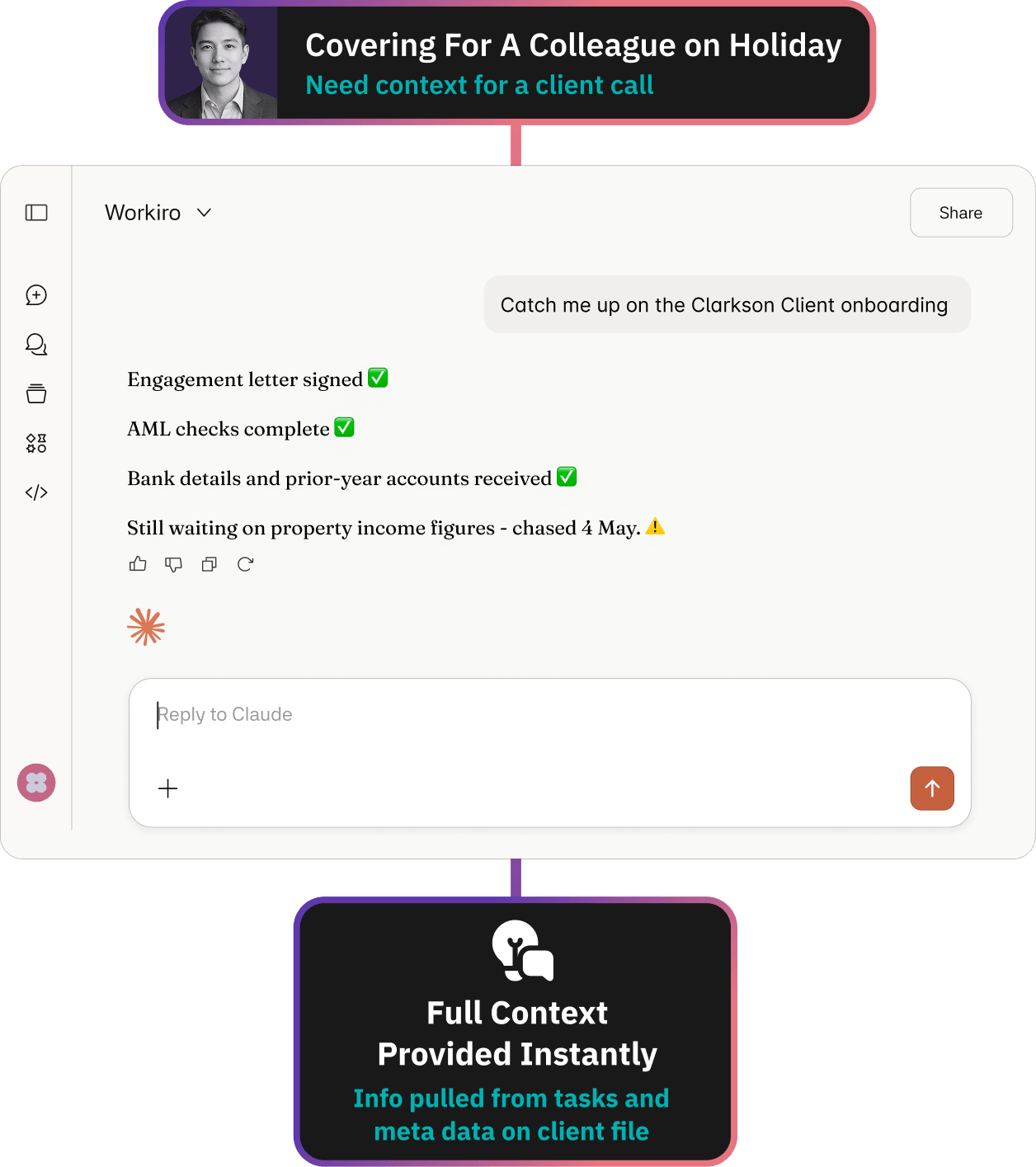
Someone's on leave, or a job changes hands. Normally that means a phone call, a forwarded thread and a "can you bring me up to speed?"

Now they ask Claude for the background and get it from the file, so the work doesn't wait for you to get back.

Before: the story of the client lives in the head of whoever ran it. When they're off, the work stalls until they're back.

After: the file holds the whole story, and Claude reads it back on request - what's done, what's outstanding, what was agreed. Anyone covering picks the job up mid-flow.

Book a Workiro demo

Workiro workflow looping a job back to the preparer after a partner requests changes, with the documents still attached

No new tool to learn. Workiro connects to the assistant you already trust.

Workiro doesn't try to out-build the big AI models - it does document management well, then plugs into the assistant your firm already uses. So you ask your questions with the agent you already use and trust.

Today that's Claude. Microsoft Copilot and ChatGPT come next.

Book a demo

How it Works

Taxcalc Logo

Connect Your Preferred Assistant.

Claude connects directly - no marketplace, no plugin to chase. ChatGPT and Copilot are on the way.

Risk removed: extra hoops before a firm can even try it.

Microsoft Outlook Logo

Choose Between Read/Write Access

The account owner chooses the access level teams can use. The AI can find information and read - it cannot change a thing unless write access is switched on.

Risk removed: an AI editing or deleting a live client record.

TurnKey Logo

Get The Answers You Need in Seconds

Ask Claude for an update on a client, any outstanding tasks or signature requests and receive an answer immediately.

Risk removed: time wasted searching for information.

Workiro MCP Server FAQs:

An MCP server is a secure connection that lets an AI assistant like Claude read from Workiro through rules you set.

Claude is available now, and connects directly. ChatGPT and Microsoft Copilot are planned. You connect the assistant your team already uses, rather than learning a new one.

Not unless the account owner deliberately allows it. The connection can be set to read-only, so the AI can find and read a client file but cannot alter it. Granting write access is a separate decision that only the account owner can make.

The account owner. Access is off by default and controlled centrally, in line with the role-based, least-privilege permissions Workiro already runs across the client file. The MCP Server is authenticated on behalf of a Workiro user, and therefore can only access the same data that they could through the main Workiro app.

Every time the AI opens a file, it goes through the same permissions and the same immutable audit trail as everything else in Workiro – who accessed what, and when. Full detail on certifications and data handling is in the Workiro Trust Centre.

Where an AI assistant stores and processes your data is set by your own agreement with that provider, not by Workiro. Each of the major assistants offers regional data residency options on its business and enterprise plans, so eligible customers can keep storage and processing within a chosen region. The available regions and qualifying plans differ by provider, so it's worth checking their own guidance – see Anthropic (Claude), Microsoft Copilot and OpenAI (ChatGPT). Whichever assistant you connect, it still only reads what your Workiro permissions allow, through the same audit trail as everything else.

No, the MCP Server is an opt-in feature of Workiro, and can only be enabled by your Workiro admin.

We keep a fuller set of AI questions and answers on our main FAQ page – covering how Workiro's own AI features handle your data, which models sit behind them, and how information is shared. See the AI tab of our Frequently Asked Questions.

You can visit our Help Centre for further information and guidance.