
OpenDocs & Invu Migration: Moving Your Documents Safely



.png)
Migrating off IRIS OpenDocs or Invu: how to move your documents without losing the filing
In short: Migrating off OpenDocs or Invu is rarely about whether the files move. They almost always do. What breaks is the filing around them: the client reference, the tag, the version order, the date something was signed. Verify a sample of your own documents before anything leaves your current system, and keep the old one running until you have.
Three weeks after a go-live, a partner goes looking for an engagement letter from 2019. The document is there. It came across with everything else. But it is sitting under a client code that no longer matches, with a filename someone typed in a hurry six years ago, and no tag to say what it is.
The file did not get lost. The way of finding it did.
That is the migration risk almost nobody talks about, because it is not the one firms ask about. The question every partner asks is "will we lose anything?" The answer is usually no. The better question is "will it arrive in a shape we can actually use?"
Your hesitation is rational, and there is data behind it
If you have been putting this off, that instinct is worth taking seriously rather than talking yourself out of.
Jason Staats runs a practice-management recommender built on switching data from thousands of firms: what they moved from, what they moved to, and whether they would recommend the switch. His read on the numbers is blunt. Firms adopting a tool and dumping it inside a year is, in his words, very common. The best twelve-month retention figure in his whole dataset was 88%, and he described that as a big step above everything else.
That is US data about practice management rather than UK data about document systems. But the shape holds, and it says something useful: a meaningful slice of software switches end in regret within the year. Your caution is not timidity. It is pattern recognition.
The point: migration fear is not an objection to be handled. It is the correct read on a market with a patchy track record. So the job is to de-risk the move, not to persuade yourself the risk is imaginary.
Before you migrate anything
🟣 The files move. The filing is what breaks. Judge every provider on what arrives around your documents, not on whether the documents arrive.
✅ Verify a sample first. Nothing should leave your current system until you have opened your own documents in the new one and found them the way you normally would.
✅ Keep the old system live through cutover. Running both for a short period is normal, not a sign something has gone wrong.
✅ Ask who runs it, and who is still there in month three. A named migration manager who stays is the difference between a switch and a scramble.
🟡 Alphanumeric working-paper schemes need a specific conversation. If you file as A1, A2, B1, B2, ask exactly how that structure maps before you sign.
The files move. The filing is what breaks
Here is a small story from a different corner of the profession that explains the whole problem.
A sole trader in HMRC's 2025/26 Making Tax Digital testing programme bought a van. His accountant, Simon Mitcham of SJCM Accountancy, hit a wall: the simplified MTD software the client was using has no full chart of accounts, only the rigid expense categories HMRC prescribes for quarterly updates. A van purchase has nowhere to go. The software provider's advice was to park it under "non-MTD items."
The van did not vanish. It was recorded. It was just recorded somewhere that made no sense, and the problem surfaced at year end when someone had to work out what "non-MTD items" contained.
That is exactly what a badly-planned document migration does, at scale. A system that cannot hold something rarely refuses it. It parks it somewhere wrong and lets you find out later.
In a document migration, four things travel separately from the file itself, and each one can quietly fail:
- The client reference. Does the document arrive attached to the right client record, or in a folder named after one?
- The filing tag or category. Is this a tax document, a payroll record, a VAT return, an engagement letter? If that classification does not come across, you have a searchable pile rather than a filed record.
- The version order. Which of these four drafts was the one that got signed?
- The date. Not the date it was migrated. The date it was created, sent or approved.
Lose the file and you notice on day one. Lose the tag and you notice in eighteen months, on the afternoon HMRC opens an enquiry into a return you filed in 2023.
What actually transfers, and what to ask about specifically
Use this as the structure for the conversation. The left column is what providers volunteer. The right column is what you have to ask for by name.
What travels with your documents, and the question to ask about each.
| What moves | Usually fine? | The question to ask |
|---|---|---|
| The document files themselves | Yes | “What happens to files your extract flags as corrupted?” |
| Client references and codes | Ask | “Do you match to our existing client codes, or create new ones?” |
| Filing tags and categories | Ask | “Do our historic categories carry across, or do we re-file?” |
| Version history | Often not | “Do we get the full version chain, or only the latest file?” |
| Original dates | Ask | “Is the created date preserved, or does everything date to migration day?” |
| Working-paper schemes (A1, B2) | Depends | “Show me how an alphanumeric structure sorts after the move.” |
| Emails linked to documents | Often not | “Does linked correspondence come across, or start fresh?” |
The check that de-risks the whole thing
There is one control that matters more than every reassurance in a sales deck: nothing leaves your current system until you have verified a sample.
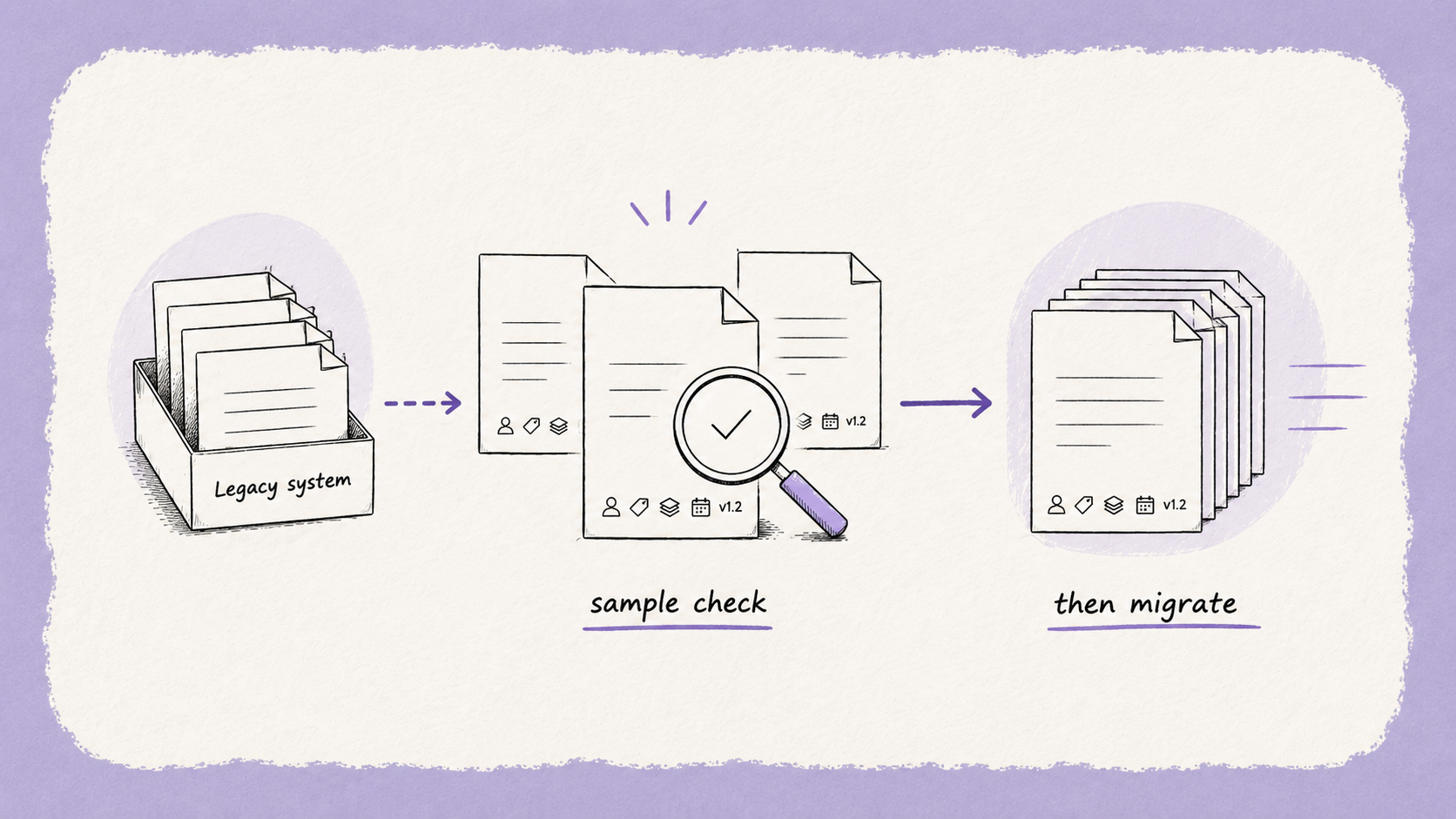
That means, in practice:
- Pick twenty documents you would actually need under pressure. A signed engagement letter. A set of working papers from a year with an enquiry. A CT600 and its supporting computations. An AML file for a client onboarded four years ago.
- Have those migrated first, as a test batch.
- Then go and find them the way you normally would, not the way the demo showed you. Search the client name. Search the document type. Sort by date.
- Only then approve the full run.
If a provider will not do this, that is your answer. If they will, you have converted an act of faith into a checkable step.
The second control is simpler: your old system stays live while the new one beds in. Many firms run both briefly during a switch. That is not a sign of a troubled migration, it is what a careful one looks like.
How long it really takes
Honest ranges, drawn from firms who have done it:
Typical migration windows, drawn from firms who have done it.
| Firm profile | Typical window |
|---|---|
| Small practice, straightforward structure | A weekend to a few days |
| Established firm, 10+ years of history | Around 21 days |
| Multi-office or heavily customised filing | Longer, and scoped case by case |
Your team's involvement should be small. The work of exporting, matching and re-tagging sits with the provider. What genuinely needs your people is the bit only they can do: deciding what "correctly filed" means for your firm, and checking the sample.
What staying costs
Every migration conversation weighs the cost of moving. Very few weigh the cost of not moving, which is usually the number that actually decides it.

For a firm on a legacy system running on its own server, that cost rarely appears as a line on an invoice. It shows up as four things instead:
- The next server. Hardware has a replacement cycle, and that bill arrives whether or not the software sitting on it still does what you need.
- The licensing that comes with it. Lloydbottoms' trigger was exactly this. Keeping the old setup alive meant new hardware and fresh Windows licensing, to preserve a system that still left them with separate storage and portal.
- The maintenance nobody counts. Andy Holland named the grind of manual daily backups and ongoing IT management as one of the biggest things he was glad to be rid of, alongside the outlay for a replacement server.
- The overhead of being the last one on a server. Informed Choice's old installation was the final server-based system in an otherwise cloud practice, and they described it as a significant cost in server space and IT maintenance. Moving halved it.
None of that is a reason to move in a hurry. But it does mean "do nothing" is not the free option it looks like on a spreadsheet. The choice is rarely spend against don't spend. It is usually spend on a server refresh, or spend on the thing that also fixes the filing.
The point: if a hardware refresh is coming anyway, that is the cheapest moment you will ever get to move. The money is going out either way. The only real question is what you get for it.
Frequently asked questions
Can I get my documents out of OpenDocs or Invu at all?
Yes. Document systems hold files in retrievable form, and a managed migration exports them along with the data that describes them. The variable is not whether extraction is possible, it is how much of the surrounding structure comes with it. Ask any provider to show you an extract from a firm like yours before you commit.
Will I lose my filing structure when I migrate?
This is the real risk, and it depends entirely on how the migration is run. Historic tags and categories can carry across, but only if that is planned for. If you file working papers using an alphanumeric scheme, raise it early and specifically, because that is the structure most likely to need a workaround.
Do I have to leave IRIS to replace OpenDocs or Invu?
No. For most firms the tax and accounts engine is the part that works well. You can keep IRIS for tax, accounts and payroll and change only the document layer. We covered that decision in more depth in our guide to choosing an OpenDocs or Invu alternative.
How much of my team's time will a migration take?
Less than most firms expect, if it is assisted. The technical work sits with the provider. Your team's real job is defining what good filing looks like for your practice and checking the verification sample. Firms that skip the second part are the ones who discover problems in month three.
What happens to documents the export flags as corrupted?
Ask this specifically, because it is where quiet losses happen. A good migration surfaces damaged files as a list to work through, often alongside your own IT provider, rather than dropping them silently. If nobody can tell you what the exception process looks like, there probably isn't one.
The honest summary
The migration is the scariest part of the decision and usually the least dramatic part of the execution. But it earns its fear, because the thing that goes wrong is invisible on day one and expensive in year two.
So judge it on the filing, not the files. Ask what arrives attached to each document. Verify a sample of your own records before anything moves. Keep the old system live until you are sure. And ask who is running it, and whether they will still be answering the phone in month three.
Steven Burch at Ketton Wealth Management put it better than we could, having been through it:
"A lot of the barriers are in your head. If I could do it again, I'd have switched earlier."
If you want to see what your own history would look like on the other side, bring us one real client file with a decade behind it. Not a demo dataset. We will show you what that file looks like once it has been migrated and tagged, and where the gaps would be. That is a more useful half hour than any feature walkthrough.
If you are not at that stage yet, the guide to choosing an alternative is the better starting point, or read how Lloydbottoms moved fifteen years of documents off a server that was about to die.
General information for accounting and professional-services firms, not advice – verify anything time-sensitive with the relevant tax authority or your professional body before acting on it.
Keep Every Client File Defensible — Without Slowing Down.
Book a demo




Industry-leading data security, for total peace of mind
We are a listed public company; currently protecting data for many of the world’s biggest professional brands.