Why Your TaxCalc Practice Needs More Than Just a Document Manager



The Quiet Admin Tax Inside Every TaxCalc Practice:
Hunting for missing documents at 8 PM isn’t a rite of passage. It’s a symptom of a disconnected workflow.
TaxCalc may handle the computation, but the evidence surrounding it often lives in an inbox, a shared drive, a WhatsApp thread, a Downloads folder, or a file named “2024-25 MISC.”
That gap is where the admin tax collects.
Not in one obvious failure, but in the small handoffs around the return: the document saved to Downloads, the approval left in an email thread, the client file updated after the fact, the partner review paused while someone rebuilds the evidence trail.
By the time anyone notices, the firm has already paid for it in lost time, weaker visibility, and capacity that never reached client work.
For a five-person TaxCalc practice, the real cost of manual filing is not the odd lost document. It is the invisible sixth team member: a full-time role’s worth of capacity spent searching inboxes, renaming attachments, chasing clients, and rebuilding evidence trails.
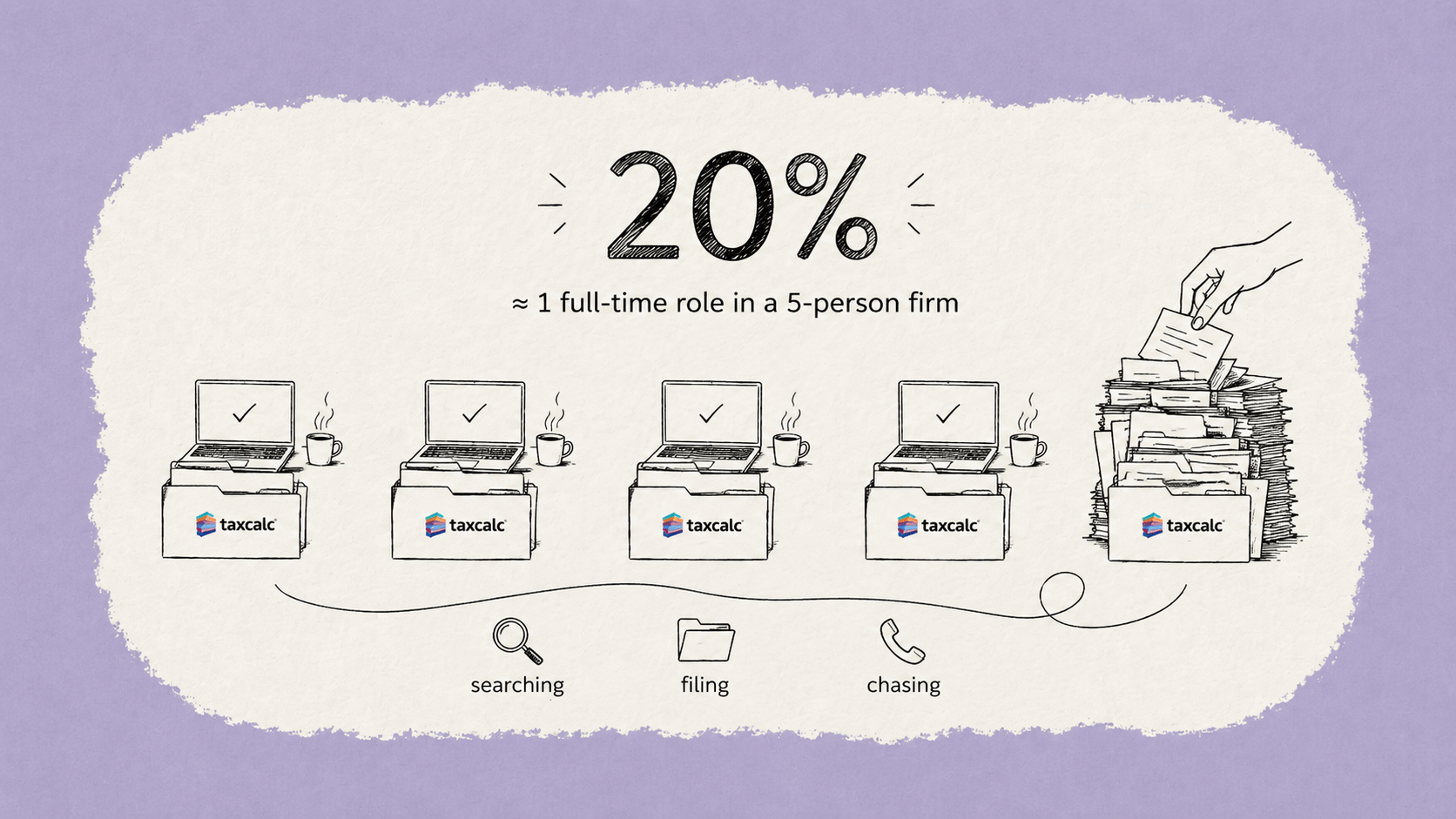
That is time your firm pays for, but never gets back as advisory work, review time, or client value.
Effective document management for accounting firms requires more than just a place to store completed returns. The problem starts upstream: client-supplied records arriving via email, WhatsApp, and the occasional posted envelope, with no consistent home and no clear link back to the computations they're meant to support.
What results is a disconnected client file. The tax calculation sits in TaxCalc, while the source documents reside in an inbox, a shared drive, or a folder labelled "2024-25 MISC." They're related, but not connected. If a query comes from HMRC, or a partner needs to review the file, someone must manually reconstruct the chain of evidence.
That reconstruction takes time nobody has, introducing a risk that extends beyond inconvenience. When computations and supporting documents are housed separately, the audit trail fractures. The question isn't whether your numbers are right; it's whether you can prove it.
That's where the real exposure lies, and it's worth examining exactly what a complete, defensible client file actually looks like.
Beyond computations: why an audit-ready file is your best defence
An accounting firm's greatest compliance risk isn't a miscalculation. It's the inability to prove how a decision was made.
The ICAEW highlights in its Practice Management Guide: "The biggest risk to an accounting firm's compliance isn't the calculation itself, but the lack of a clear audit trail showing how the data was gathered and approved." This is a crucial reframe. TaxCalc can produce an accurate computation, but if the supporting evidence is scattered across email threads, desktop folders, and WhatsApp messages, that accuracy means little when a regulator or insurer asks questions.
An audit-ready file means every document, approval, and client communication is timestamped, version-controlled, and retrievable on demand. In UK practice, that's not a luxury. Professional indemnity insurers are increasingly scrutinising whether a firm can demonstrate its process, not just its output. A file showing a signed engagement letter, the source documents, the preparer's review, and the client's approval is a fundamentally different asset from one that relies on "I'm sure I emailed that."
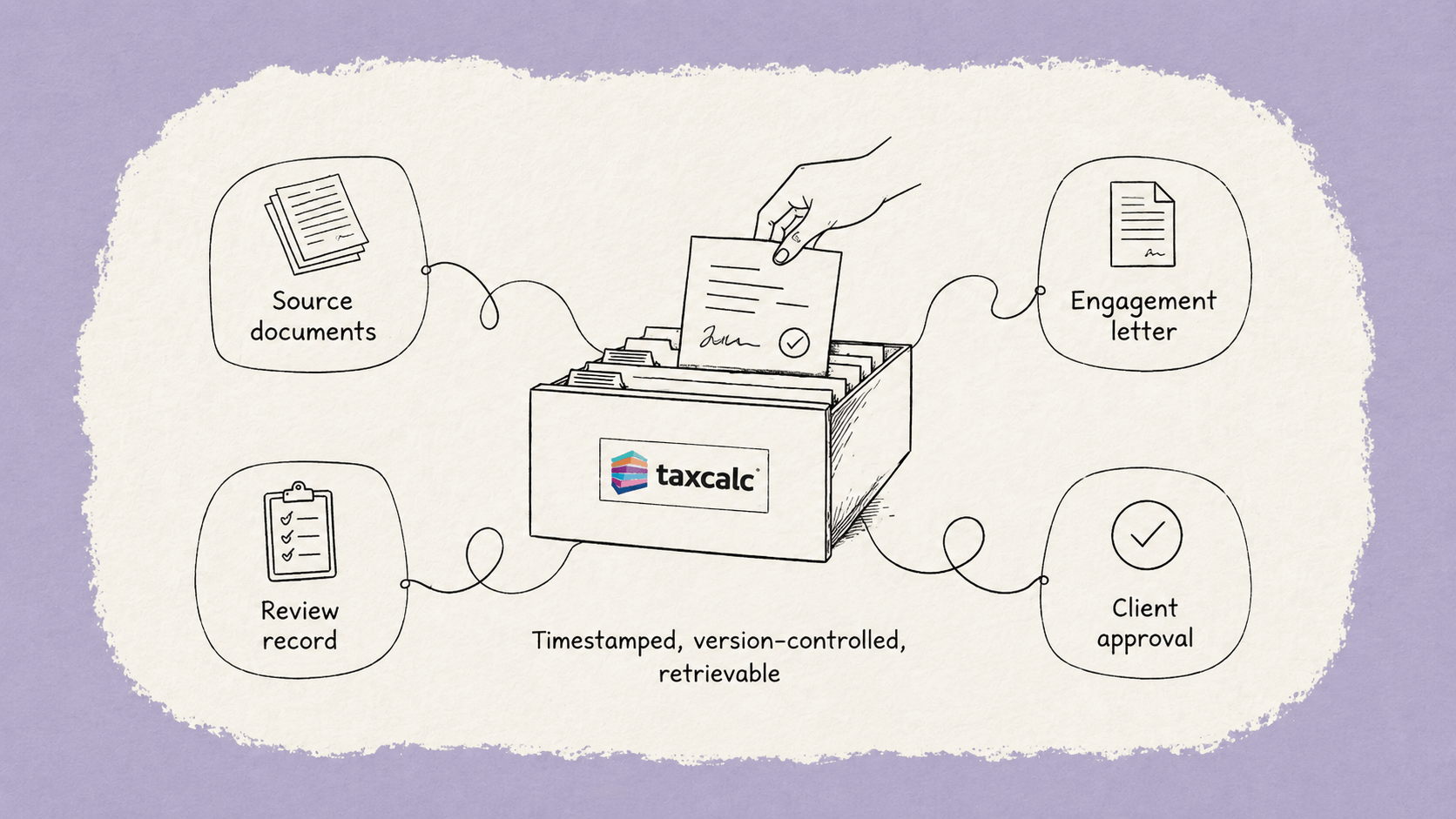
The gap between those two scenarios is where professional liability risk resides. Secure file sharing for accountants isn't simply about convenience or reducing email attachments; it's about creating a defensible chain of evidence that holds up if challenged.
This is even more critical as HMRC's Making Tax Digital requirements tighten expectations on data movement through your practice, raising the question of what a genuine digital link actually looks like in daily TaxCalc workflows.
The digital link: meeting HMRC MTD requirements with TaxCalc
MTD compliance isn't just about submitting figures digitally. It's about proving the entire journey from raw documents for tax preparation through to final submission stays unbroken.

HMRC's VAT Notice 700/22 is clear: firms must maintain a digital link between every software program involved in a tax submission. This means the connection between your client's source records and your TaxCalc computations can't involve manual steps. The moment someone saves a file to their desktop, renames it, then re-uploads it elsewhere, the digital chain breaks.
Administrative friction and manual data handling pose significant risks in MTD compliance. When data is manually saved and renamed, it breaks the digital link, leading to compliance failures. Common ways this gap appears:
- Downloading and re-uploading source documents between client portals and your filing software without a traceable, automated link
- Copy-pasting figures from a spreadsheet or email into TaxCalc rather than pulling from a connected, time-stamped source
- Saving revised workings locally before filing, creating an unrecorded version gap between what the client approved and what was submitted
A broken digital link isn't just a filing risk. It's a compliance failure HMRC can act on.
The standard isn't punishing firms for using multiple tools. It's requiring those tools to communicate in a logged, auditable way. As covered in the previous section, an audit-ready file depends on traceability at every step. MTD makes that traceability a legal requirement, not a best practice.
This raises an important question about the tools sitting alongside TaxCalc in your practice stack. Not all document management solutions are built to maintain a true digital link. The next section examines what to assess when evaluating your options.
Document storage vs workflow: what TaxCalc practices actually need
Most accounting practices don't have a document management problem. They have a collaboration problem, and they're trying to solve it with storage.
The TaxCalc document manager offers firms a structured place to file client documents, linked directly to client records within TaxCalc. This integration is genuinely useful. Accounts, returns, and supporting papers sit alongside the tax data that produced them. For a firm focused on keeping files organised and meeting MTD digital link requirements, it covers the basics. The limitation isn't what it stores, it's what it doesn't do once those files are there.
A file repository holds documents. A collaboration layer moves work forward.
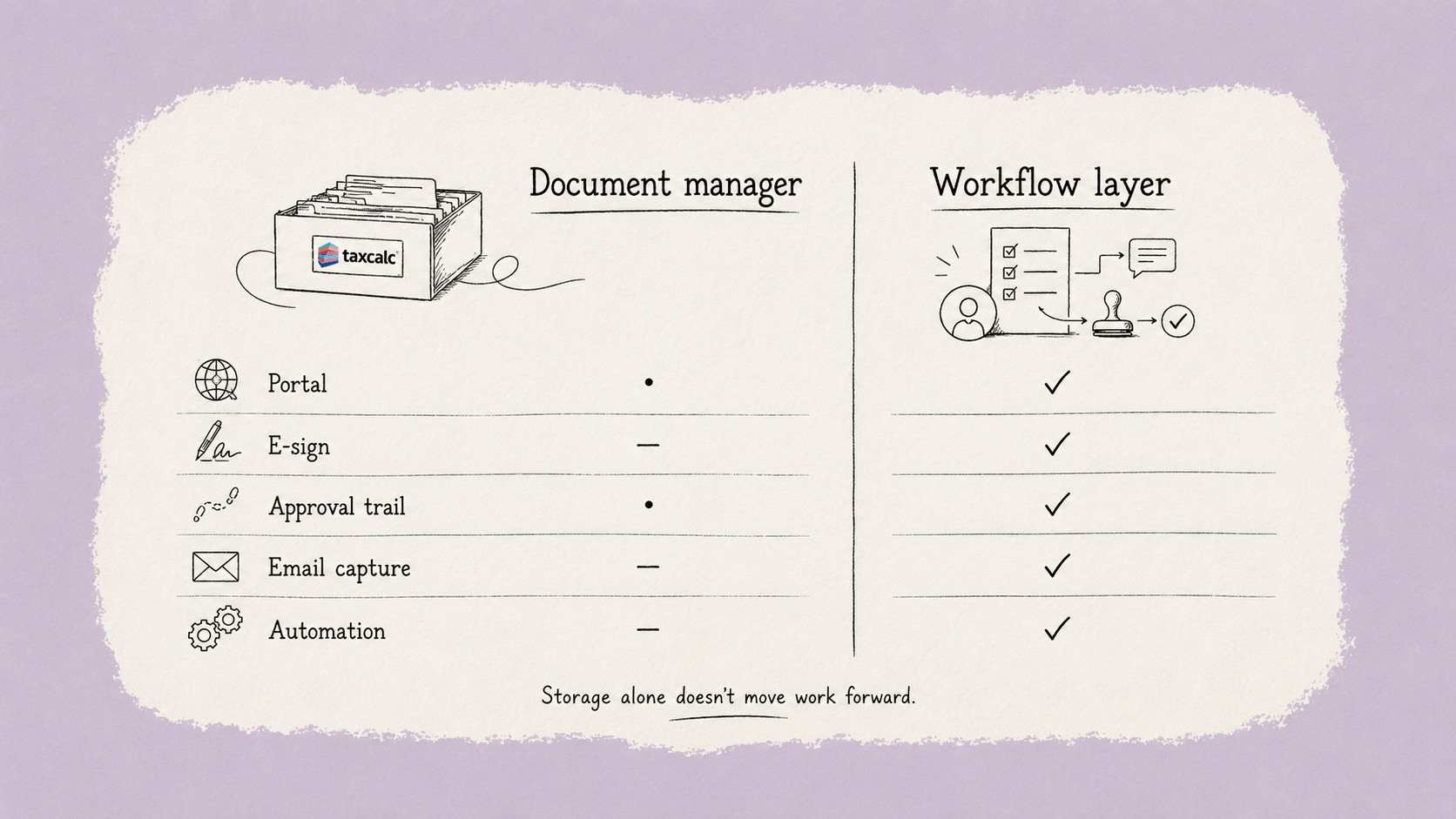
The distinction matters more than it sounds. In practice, the moment a document leaves TaxCalc, sent to a client for signature, shared with a colleague for review, chased via email, it enters a gap. That gap has no audit trail, no automatic filing, and no single source of truth. Approvals sit in inboxes. Signed copies arrive back by email and need manual uploading. Clients miss deadlines because chasing happens outside any system. This is where efficiency breaks down, and it's why 48% of UK accounting firms name 'improving workflow and efficiency' as their top strategic priority, not tax accuracy, not compliance. Workflow.
When assessing what a TaxCalc user should actually be looking for beyond the built-in document manager, the comparison comes down to a few critical capabilities:
The gap isn't technical, it's operational. A firm using a standalone document manager still relies on email, spreadsheets, and manual chasing to bridge the space between filing and completion. That friction compounds fast at busy periods, and it's exactly where compliance risk lives.
What TaxCalc users should look for is a platform that doesn't replace TaxCalc but works alongside it: capturing every client interaction automatically, handling signatures without the confusion of separate tools, and building an audit-ready record without anyone having to think about it. That's the difference between a document manager and a genuine workflow layer, and it's where the next step in this conversation begins.
How Workiro bridges the gap for TaxCalc power users
Workiro transforms your TaxCalc workflow from a filing system into a fully audit-ready client file, automatically, without chasing. That's the practical difference between a document store and a document system.
TaxCalc handles the tax. Workiro is the collaboration layer, managing everything that supports it: client emails, signed engagement letters, approval confirmations, and the back-and-forth that currently lives in inboxes and disappears when someone needs to evidence it. When these two tools work alongside each other, the gaps close.
Capture every interaction automatically. Workiro captures every email, document, approval, and signature against the right client record without anyone manually filing it. In practice, this means nothing falls through the cracks during a busy self-assessment period. Your team isn't reconstructing a timeline six months later; it's already there, timestamped and retrievable.
Approve without the email trail. Client signatures and approvals are a persistent weak point in most practices. When approvals sit in email threads, they're hard to find, easy to miss, and almost impossible to audit. Workiro routes signature requests through a structured workflow, so clients sign without needing an account login, and the completed document files itself. If you're not yet confident in the process, this guide to adding e-signatures walks through the mechanics clearly.
File with zero manual effort. Once the interaction happens, Workiro files it. No drag-and-drop. No naming conventions to remember. No risk of a document sitting in Downloads for three weeks.
The result is a practice where audit-readiness isn't a January scramble. It's the default state. The next section pulls these threads together into a clear bottom line.
The bottom line: what you need to know
Accounting practice efficiency comes down to a simple split: TaxCalc handles the tax, Workiro handles the evidence that supports it. Treat them as competing tools and you'll keep patching gaps. Treat them as complementary and your client file builds itself.
The cost is not just lost time. It is lost visibility: no single place to see what was received, approved, signed, filed or still outstanding.
That's one day a week per person spent filing, chasing, and re-sending, rather than doing work that actually moves clients forward. Automation isn't a nice-to-have at that scale. It's the only rational response.
Here's what the evidence points to
- TaxCalc is for tax. It calculates, files, and tracks returns. That's its job, and it does it well.
- Workiro is for the audit trail. Emails, approvals, signed letters of engagement, client responses — all captured, filed, and retrievable without manual effort.
- Audit-readiness runs 365 days a year. A client file that's only tidy in January is a liability the other eleven months. Over 65,000 professionals trust Workiro to keep more than a billion documents continuously organised and compliant.
- Secure sharing and e-signatures belong in the same workflow. When documents, approvals, and signed engagement letters sit together, the client file becomes easier to manage and easier to evidence.
The path to true accounting practice efficiency
Moving beyond a basic document repository isn't about adding complexity; it's about removing the manual friction that slows your firm down. To transition your TaxCalc practice toward a more efficient, audit-ready model, focus on these three pillars

- Consolidate your documents for tax preparation. Ensure every record—from a stray WhatsApp photo of a P60 to a formal bank statement—lands in a single, timestamped client file automatically. This keeps your documents for tax preparation organised from the moment they arrive.
- Standardise secure file sharing for accountants. Stop relying on email attachments. Use a passwordless portal that allows clients to upload and sign documents instantly, maintaining a clear digital link for HMRC compliance. This robust approach to secure file sharing for accountants is what separates efficient firms from those buried in admin.
- Automate the audit trail. Your file should be "audit-ready client files" by default. This means every approval and communication is logged without your team having to manually move files or rename folders, ensuring your audit-ready client files are always prepared for scrutiny.
Workiro closes the gap around TaxCalc: the emails, documents, approvals, signatures, and client responses that usually sit outside the return.
Instead of asking your team to manually rebuild the evidence trail later, Workiro captures it as the work happens. Every interaction is filed against the right client record, so the audit trail builds in the background.
Ready to see it in action? Book a Workiro demo to see how we help TaxCalc power users build a more efficient, defensible practice.
Keep Every Client File Defensible — Without Slowing Down.
Book a demo




Industry-leading data security, for total peace of mind
We are a listed public company; currently protecting data for many of the world’s biggest professional brands.